Cancel a WordPress Woocommerce Order

By | April 19, 2024

Login to your WordPress Control Panel

Navigate to ‘WooCommerce’ then ‘Orders’.

Find the order and Click on it.

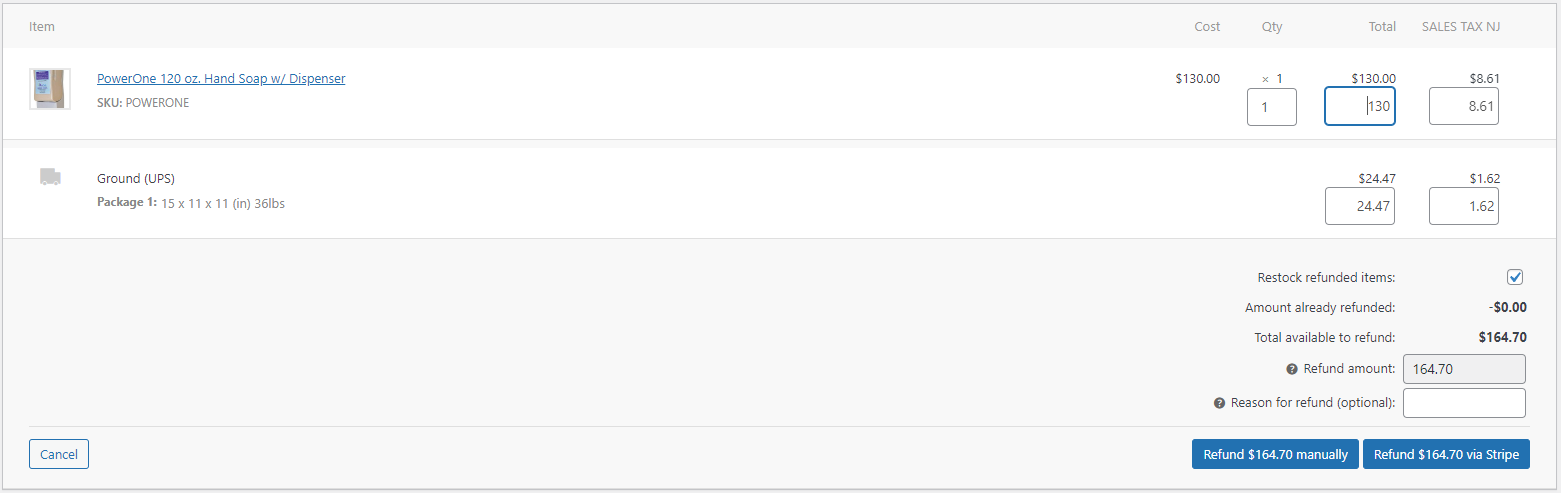
Scroll down to where your see the purchasing details and select ‘Refund’. Adjust the Qty and assure that all the boxes have the amount populated so that the ‘Refund Amount’ matches the ‘Total available to refund’. Then refund the amount using the payment system. Once completed you’ll see the page update with ‘Refunded’.
One thought on “Cancel a WordPress Woocommerce Order

  1. phswerteapp

    Alright, so I downloaded this phswerteapp thing. It’s kinda neat, though not my usual jam. If you’re into the stats and stuff, might be your thing. Give it a whirl, could surprise ya. Download it here: phswerteapp

    Reply

Leave a Reply

Your email address will not be published. Required fields are marked *